Pull Request Review
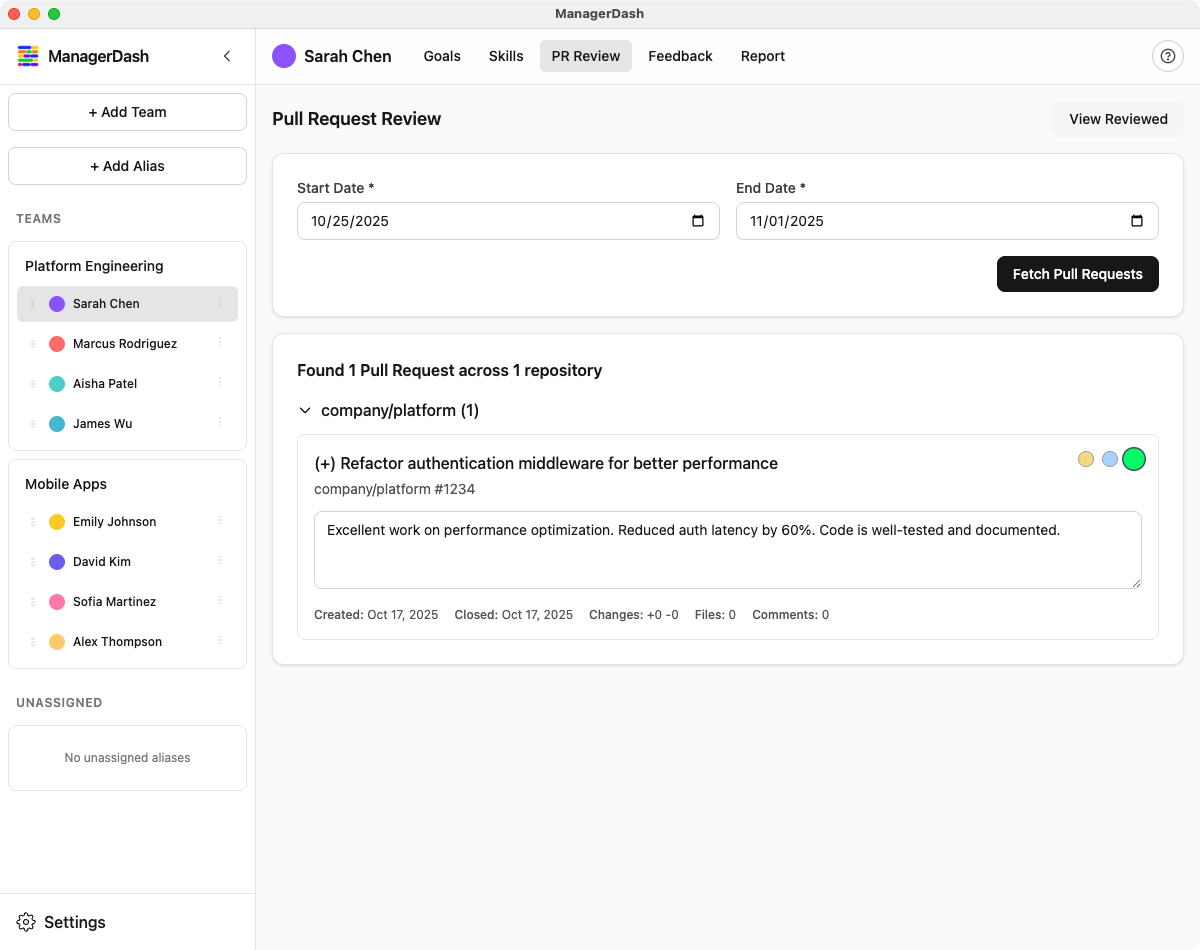
This guide covers how to fetch, review, and rate pull requests in ManagerDash.
Understanding PR Review
The PR Review feature helps you:
- Fetch PRs directly from GitHub
- Rate PR quality and complexity
- Add context and notes to each PR
- Track PR metrics over time
- Include PR evaluations in reports
Prerequisites
To use PR Review, you need:
- GitHub username configured for the person (in their contributor profile)
- GitHub Personal Access Token (configured in Settings → Configuration)
- Internet connection to fetch from GitHub
Setting Up GitHub Integration
See "GitHub Token Setup" for instructions on how to generate a token and add it to ManagerDash
Fetching Pull Requests
Auto-Fetch on Load
Starting in v1.6.0, ManagerDash automatically fetches pull requests when you navigate to the PR Review tab:
- Select a person from the sidebar
- Click the PR Review tab
- The date range defaults to the last 7 days
- PRs are automatically fetched in the background (regardless of state)
- A skeleton loading state shows while fetching
- PRs appear grouped by repository once loaded
Manual Fetch
You can also manually trigger a fetch or refetch with different date ranges:
- Select a person from the sidebar
- Click the PR Review tab
- Adjust the date range if needed:
- Start Date: Beginning of period
- End Date: End of period (today by default)
- Click "Fetch Pull Requests" to retrieve all PRs from the selected date range
- Wait for the fetch to complete (may take several seconds)
- PRs appear grouped by repository
What Gets Fetched
Starting in v1.7.0, the system fetches all pull requests regardless of state:
- All PR States: Open, Closed, Draft, and Merged PRs
- Author Match: PRs where the person is the author
- Date Filter: PRs created within the selected range (filters by creation date across all states)
- All Repos: Across all repositories they (and your token) have access to
- Draft PRs Included: Work-in-progress PRs are now included, giving you a complete picture of contributions
This enhancement allows you to see the full scope of someone's work, including draft PRs that may represent significant in-progress contributions.
Understanding PR States
Each pull request displays a color-coded state indicator for quick visual scanning:
PR State Indicators:
- Open (Green pill) - Active pull requests ready for review
- Draft (Gray pill) - Work-in-progress PRs not yet ready for review
- Closed (Red pill) - PRs closed without merging
- Merged (Purple pill) - Successfully merged pull requests
The state is determined by priority: merged → closed → draft → open. For example, a merged PR will always show "Merged" regardless of other attributes.
PR Data Included
For each PR:
- Title: PR name
- Repository: Repo name
- PR Number: Link to GitHub
- State Badge: Visual indicator (Open/Draft/Closed/Merged) with color coding
- Dates: Created and closed/merged dates
- Changes: Lines added/deleted
- Files: Number of files changed
- Comments: Total comments and review comments
- Labels: Any GitHub labels
Rating Pull Requests
The Traffic Light System
PRs are rated using a three-level system:
| Symbol | Color | Meaning |
|---|---|---|
| - | Yellow | Feedback opportunity |
| = | Blue | Meets expectations |
| + | Green | Exceeds expectations |
How to Rate
- Find the PR in the list
- Click one of the three colored circles:
- Yellow (left): Feedback opportunity
- Blue (middle): Meeting expectations
- Green (right): Exceeding expectations
- The circle glows and enlarges when selected
- Rating saves automatically
Rating Criteria
Feedback opportunity (-): Rating a pull request as a feedback opportunity is a way for managers to find trends in technical contributions, not as an error tally. It should be relative to the engineer's past performance and experience level. For example. A PR from an early career engineer that undergoes multiple rounds of review may suggest a mini retro in a 1:1 to ensure they are learning from the experience. A PR from a more senior engineer that requires significant rework may suggest a larger coaching conversation around doing more thorough planning or technical design.
Here are a few other reasons why you may mark a PR as a feedback opportunity:
- Requires significant rework
- Multiple rounds of review needed
- Poor code quality or design, or would have benefitted from additional planning
- Incomplete testing or documentation
- Breaks existing functionality/needs to be reverted
When you mark a PR as a Feedback Opportunity, your notes will be automatically created as feedback (type: feedback, state: pending) in the person's Feedback tab, preserving the context of the PR review and ready for you to deliver in your next 1-on-1.
Meeting Expectations (=): A PR is Meeting Expectations if it is a good representation of the contribution expected from an engineer at any level. What is defined as quality contributions will vary between companies and teams, but some examples of contributions that meet expectations are:
- Clean, well-structured code
- Normal review process
- Basic testing included
- Clear purpose and implementation
- Minor feedback addressed
- Descriptive test cases
Exceeding Expectations (+): A PR is Exceeding Expectations if it represents an outstanding contribution from an engineer who is operating above their level. For an entry-level engineer, an exceptional contribution could be one that fixes a tricky race-condition. For a more senior engineer, an exceptional contribution could be one that solves an entire class of problems through a clear refactor. Some other reasons why a contribution may be rated as exceeding expectations:
- Exceptional quality
- Comprehensive testing
- Great documentation
- Handles edge cases
- Considers future maintenance
When to Rate
Rate PRs When:
- You've reviewed the PR thoroughly
- You have enough context to evaluate
- The contribution is meaningful (ie: not bumping a dependency)
- It would provide good context during a performance review
Don't Rate If:
- You haven't reviewed it
- You lack context to judge
- It's trivial (typo fixes, etc.)
Adding Notes to PRs
Why Add Notes
Notes help you:
- Document reasoning for ratings
- Capture specific examples
- Remember context months later
- Prepare for performance discussions
- Justify ratings in reviews
How to Add Notes
- Rate the PR first (select a circle)
- A text area appears below the PR
- Optionally, specify the Author of the feedback (defaults to you if left blank)
- Type your notes
- Notes save automatically after 500ms
- No "Save" button needed
Note: The PR title and your review context are automatically preserved when creating feedback from PR reviews, making it easy to reference specific contributions later.
What to Include in Notes
Good Notes Include:
- Specific observations
- Technical details
- Impact assessment
- Review cycle summary
- Learning moments
Examples:
Not meeting (-):
"Required 3 rounds of review. Initial implementation missed
error handling and had unclear variable names. Eventually
got to acceptable state but needed significant guidance."

Meeting (=):
"Solid implementation of feature X. Clear code, good tests.
One round of minor feedback on naming conventions.
Merged smoothly."

Exceeding (+):
"Outstanding work on performance optimization. Not only
solved the immediate problem but proactively added
benchmarks and documentation. Reduced query time by 80%.
Excellent example for the team."
Opening in GitHub
Click the PR title to open in your browser:
- Opens GitHub PR page
- View full conversation
- See code changes
- Check review comments
Common Workflows
Weekly Review
Friday:
1. Select team member
2. Set date range to last 7 days (this is the default)
3. Fetch PRs (includes open, draft, closed, and merged)
4. Review draft PRs for in-progress work if needed
5. Rate contributions of note
6. Add quick notes
7. Repeat for each team member
Monthly Performance Check
End of month:
1. Set date range to last 30 days
2. Fetch PRs (or view PRs already reviewed)
3. Review all PRs for patterns
4. Rate and add detailed notes
5. Include in monthly 1-on-1
Quarterly Review Prep
2 weeks before review:
1. Set date range to 90 days
2. Fetch PRs
3. Rate all PRs
4. Add comprehensive notes
5. Look for patterns (improvement/decline)
6. Generate report
7. Use in performance discussions or promotion pitch
Best Practices
Rating Consistency
- Define Standards: Document what each rating means for your team
- Calibrate Regularly: Discuss ratings with other leads
- Context Matters: Consider complexity and scope
- Be Fair: Don't compare early career to senior
- Trend Over Time: Look for improvement patterns
- Draft PRs: Consider reviewing draft PRs to provide early feedback, though you may want to wait until they're ready for final review
Note-Taking
- Be Timely: Add notes within days of merge
- Be Specific: Reference concrete issues or wins
- Be Balanced: Note good the good work you want to highlight, as well as any opportunities for growth
- Be Professional: Focus on work, not person
- Be Future-Focused: Help your future self remember
Reporting
PR data appears in reports:
Individual Reports
- Total rated PRs in period
- Rating breakdown (Not meeting/Meeting/Exceeding)
- Individual PR details
- Notes included
- Metrics summary
Export Format
Reports include:
- PR title and repo
- Rating with label
- Dates and metrics
- Notes for context
- Markdown formatted
Common Issues
No PRs Found
Problem: Fetch returns no results Solution:
- Verify GitHub username is correct in contributor profile
- Check date range (too narrow?)
- Ensure person authored PRs in that period
- Verify GitHub token is valid
- Check internet connection
Can't Fetch PRs
Problem: "Failed to fetch" error Solution:
- Check GitHub token in Configuration
- Verify token has correct permissions
- Check internet connection
- Try refreshing the app
- Generate new token if expired
Rating Not Saving
Problem: Click rating but it doesn't stick Solution:
- Wait for save indicator
- Check console for errors
- Try refreshing the page
- Re-rate the PR
Notes Disappearing
Problem: Type notes but they vanish Solution:
- Wait 500ms after typing (auto-save delay)
- Don't navigate away immediately
- Check that PR was rated first (notes only for rated PRs)
- Try refreshing and re-entering
GitHub Token Invalid
Problem: "Invalid token" error Solution:
- Regenerate token on GitHub
- Ensure correct scopes selected
- Copy entire token (no spaces)
- Save in Configuration
- Try fetching again
Privacy and Security
Token Security
- Token is stored locally on your machine
- Never transmitted except to GitHub API
- Rotate tokens periodically
- Revoke old tokens on GitHub
- Don't share your token
Data Privacy
- All PR data stored locally
- Ratings and notes are private
- Only visible on your machine
- Export carefully for sharing
Keyboard Shortcuts
While viewing PRs:
- Tab: Navigate between PRs
- 1, 2, 3: Quick rate (Not meeting, Meeting, Exceeding)
- Enter: Expand/collapse repository
- Click Title: Open in GitHub